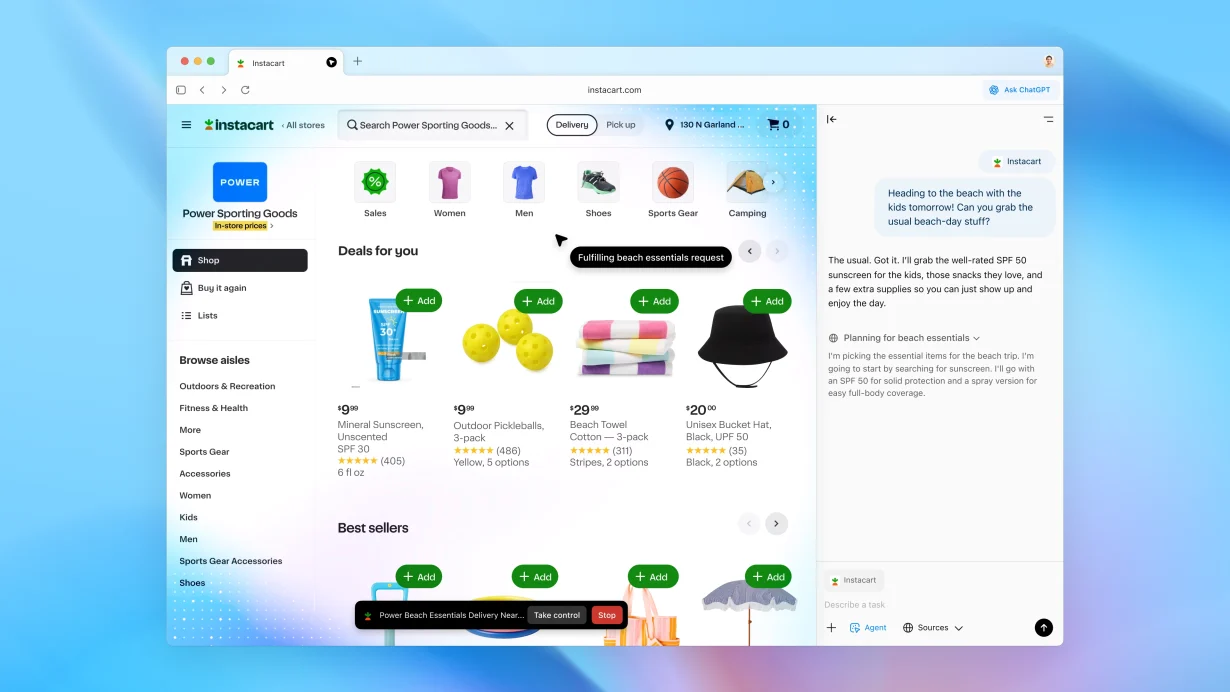

OpenAI has unveiled ChatGPT Atlas — an AI-powered browser that can summarize, write code, automate tasks, and reshape how humans and machines interact. This article takes a technical deep dive into Atlas and its implications for developers.
From Chatbot to AI Browser – OpenAI’s Strategic Leap
Since the launch of ChatGPT in 2022, OpenAI has led the era of natural language interfaces. Yet, most interactions have remained confined within a “chat box.”
According to OpenAI’s official announcement, Atlas is more than a browser — it’s an AI workspace, capable of understanding user context, remembering actions, and providing intelligent automation across web activities.
Core Architecture and Technology
ChatGPT Atlas is built on Electron + Chromium, but what makes it unique is the GPT-5 integration layer embedded directly into the browser core. Its architecture consists of several key modules:
| Component | Role |
| Core LLM Layer (GPT-5) | Foundation for all queries — text, code, and contextual reasoning. |
| Contextual Engine | Tracks and understands user context: open tabs, web content, and user actions. |
| Agent Runtime | Executes tasks — e.g., filling forms, downloading files, running scripts, or opening terminals. |
| Security Sandbox | Isolates model operations and enforces access control. |
Crucially, Atlas exposes an internal API compatible with the OpenAI SDK, allowing developers to build plugins or AI Agents that run directly within the browser — no need for traditional extensions.
For example, a developer could write a module like this (pseudo-code):
const { agent } = require('@openai/atlas');\agent.define("SummarizeDocs", async (ctx) => {
const content = await ctx.readPage();
const summary = await agent.llm("gpt-5").summarize(content);
ctx.display(summary);
});Each agent runs inside its own sandbox, with permission handling similar to the WebExtensions API — but with the power of language models to interpret and act intelligently.
Atlas as a Lightweight AI IDE
OpenAI positions Atlas as a lightweight alternative to traditional IDEs for certain workflows — especially documentation, open-source review, and API exploration.
Key developer-focused features include:
- AI Code Assistant – Analyzes GitHub repositories or API docs, suggesting CLI commands or code snippets.
- Inline Reasoning – Explains unfamiliar code directly in context.
- Contextual Memory – Retains past projects, prompts, and snippets for persistent workflows.
- Extended Command Palette – Execute tasks through prompts, e.g.,
Ctrl+Space → "Deploy to Vercel"or"Generate test cases".
For many developers, this makes Atlas feel like an AI shell for the web — you control and code through conversation rather than commands.
Implications for the Developer Ecosystem
Redefining the Developer Workflow
Traditionally, development requires multiple tools: VS Code, terminal, browser, and API clients.
With Atlas, OpenAI envisions a unified environment — a place to read documentation, write, test, and debug code all in one interface.
Competition and Compatibility
Atlas competes with Arc Browser (The Browser Company) and Microsoft Edge Copilot.
However, OpenAI’s ownership of GPT-5 and AgentKit SDK gives it an edge in “AI-native” integration.
In 2026, OpenAI plans to open the Atlas Dev Program, enabling developers to package “AI Applets” and distribute them through an official marketplace (akin to the Chrome Web Store).
Potential for Open APIs
Currently available for macOS, Atlas’s internal design uses WebSocket and OpenAI API keys — hinting that web apps may soon communicate directly with in-browser AI agents.
If fully opened, this could establish a new standard for AI-browser interaction, reshaping how developers build intelligent web experiences.
Technical and Ethical Considerations
Security and Sandboxing
OpenAI claims Atlas employs a WASM-like sandbox to ensure agents cannot write to local files or transmit data externally without explicit permission.
Still, security researchers have questioned whether an AI capable of reading entire web pages can ever be truly privacy-safe.
Performance
Embedding an AI engine increases CPU and memory usage compared to standard browsers.
However, OpenAI says Atlas uses on-device caching and partial inference — meaning some natural-language processing occurs locally, similar to Microsoft’s Copilot+ PCs.
Long-Term Impact
If Atlas gains traction, we could witness a fundamental shift: the browser becoming both an IDE and an AI agent runtime.
This paves the way for a new generation of “AI-native” applications, where code and data are unified through conversational interfaces.
Conclusion: Atlas — The Browser for the AI Era
ChatGPT Atlas isn’t just another OpenAI product — it’s a strategic statement: AI is no longer confined to standalone apps; it’s becoming the default interface layer of the Internet.
For developers, this signals a future where software development won’t rely solely on programming languages, but on natural language and human-AI collaboration.